Add and share an event
Last updated 3 August 2026
Events on gliding.net.nz — competitions, courses, camps, task weeks, working bees — appear on the events page. Club members can add events for their own club, and contest admins can add events for any club. This page covers adding one, and the single setting that decides who else gets to see it.
Adding an event
-
Go to the events page and select Add Event. The button appears if you are any of:
- a current member of the club whose site you're on — for most people this comes from their GNZ club membership itself, with no special role needed. The Club member role does the same thing, and is normally only granted to give someone event access at a club they aren't a member of;
- a contest admin, on any club's site; or
- a GNZ administrator.
On gliding.net.nz itself the event would belong to Gliding New Zealand rather than to a club, so there only contest admins and GNZ administrators see the button — add your club's events from your club's own site. If you think you should see it and don't, check you're signed in, then ask your club admin to confirm your membership is current. See Roles and permissions for the full picture.
-
Give the event a name, choose its type, and set the start date.
-
If it runs over more than one day, tick End Date and set the last day. The number of days appears next to it so you can check it looks right.
-
Decide whether to tick Share to all other clubs — see below.
-
Select Add Event.
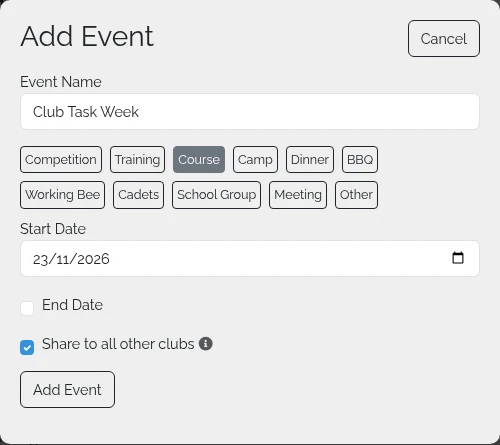
You're taken straight to the event's edit page, where you can add the detail that matters to entrants — location, cost, contact details, entry form, and a description. None of that is required to create the event, so you can come back to it later.
Where your event appears
An event belongs to the club whose site you added it from. If you add an event while on your club's site, it belongs to your club; if you add one from gliding.net.nz itself, it belongs to Gliding New Zealand.
By default an event only shows on the calendar of the club that owns it. That is usually what you want for a club working bee or a members' evening.
Tick "Share to all other clubs" to put it on the national calendar and on every other club's events page. Use it for anything open to pilots from other clubs — contests, task weeks, cross-country courses, camps.

This is the most common surprise on the events page: you add a competition from your club's site, then look at gliding.net.nz and can't find it. The event was created correctly — it just hasn't been shared.
Changing it later
Nothing here is permanent. Open the event and select Edit Event — the same Share to all other clubs checkbox is at the top of the form, so you can share an event you've already added, or unshare one that shouldn't have been.
If you accidentally add the same event twice, open the copy you don't want and select Delete Event. You'll be asked to confirm first.